 Tutorial Tutorial
These instructions assume you have successfully completed JAS Tutorial Part 3: Performing Data Analysis.
In part 3 you generated the source code for the new java class to be used for your analysis. You are now ready to compile, load and run the code. This tutorial details each step of the procedure.
Compiling in Java involves converting the source file (*.java) to a java byte code file (*.class). In order to be able to load and run your analysis routine or event generator, you must compile the source file. There are several ways to do this:
 .
You can choose which compiler this activates by selecting the 'Compiler' tab on the 'Options' dialog, but
initially the button will
activate the 'jikes' compiler. An output window will show
the compiler's output and return code. The advantage of using this option is that you can edit the source file
in the JAS GUI, and when you re-compile, the newly compiled class is automatically loaded
in place of the old one.
.
You can choose which compiler this activates by selecting the 'Compiler' tab on the 'Options' dialog, but
initially the button will
activate the 'jikes' compiler. An output window will show
the compiler's output and return code. The advantage of using this option is that you can edit the source file
in the JAS GUI, and when you re-compile, the newly compiled class is automatically loaded
in place of the old one.javac MyAnalysis.java
at a DOS command prompt. If there are no syntax errors, the source code will be compiled
and a file containing java byte code called MyAnalysis.class will be created.| Use the built-in compiler by pressing the compile button on the toolbar .
|
After a successfully compiling your source code, MyAnalysis.java, a java byte code is created, MyAnalysis.class. You are now ready to load your compiled code.
In order to be able to run an analysis routine or event generator, you must load a compiled source file.
Load your compiled code by selecting 'Load...' from the 'Job' menu or,
click on the load button on the toolbar  ,
or select 'Load' from the popup menu generated by right clicking your
mouse on the page displaying the code. ,
or select 'Load' from the popup menu generated by right clicking your
mouse on the page displaying the code.
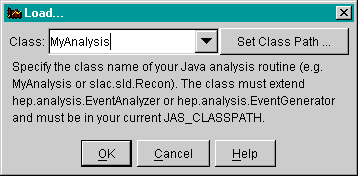
Enter the class name, without an extension, in the text field of the GUI generated as shown below. |
When JAS loads a class it looks in your class path, which is a set of default directories where JAS looks for *.class files. You can assure that your MyAnalysis.class file is in the JAS class path by viewing and setting the class path.
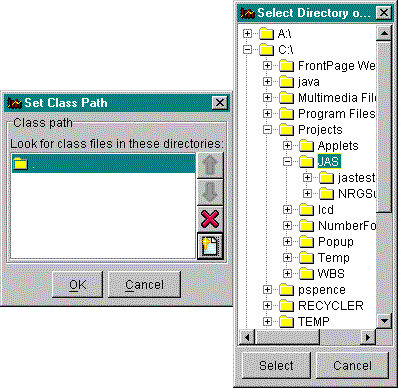
| View and set the class path by clicking on 'Set Class Path...' in the load GUI. The class path GUI, shown below, will be generated. Select the bottom button on the right side toolbar and use the generated browser to point to the directory where you saved your class, MyAnalysis. Click the 'Select' and 'OK' buttons. |
| After checking the class path you are ready to load the file into JAS. Click on 'OK' in the load GUI. |
When the class is successfully loaded, it will appear in the job tree of the main JAS display with a folder called 'Programs' that includes the histograms defined in the source file. If you recompile a loaded class, the job will automatically reload the new version.
You are now ready to run your code.
After compiling and loading your code you will be ready to run the analysis process. If you have set up a local job, then the job process will take place on the local machine. If you have set up a remote job, then the job process will take place on the server you selected (i.e. sldnt0.slac.stanford.edu).
Click the 'Go' button located on the toolbar , or select
'Go' form the Job menu. , or select
'Go' form the Job menu.
|
You are now ready to proceed to Jas Tutorial Part 5