 Tutorial Tutorial
These instructions assume you have successfully completed JAS Tutorial Part 2: Starting a Job.
Now that you have a data set open, you may wish to write an analysis routine. In this example you will use the New Program Page wizard to generate a source file which will be used to analyze your data. This wizard is used to create custom source files suited to your needs while following Java language requirements and JAS specifications for event analyzers and event generators.
Begin the New Program Page Wizard by selecting the image  on the JAS toolbar.
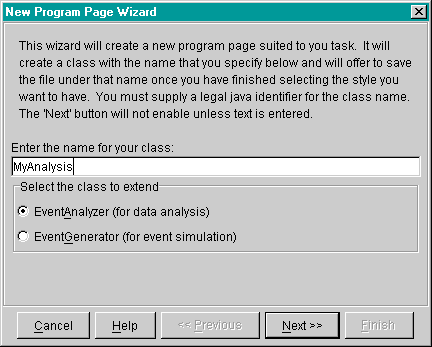
The opening page of the Program Page Wizard, shown below, will appear. on the JAS toolbar.
The opening page of the Program Page Wizard, shown below, will appear.
Enter 'MyAnalysis' as the name for your class and choose EventAnalyzer as the class to extend. Click Next. |
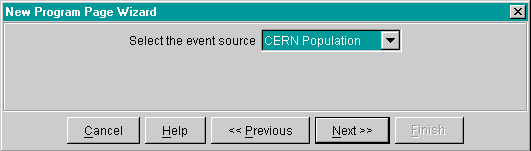
In the case of data sets that have multiple event sources, like pawdemo.hbook, the wizard will not go directly to the setup page. First it will take you to the page shown below, which asks you to select an event source to use.
| For the 'pawdemo.hbook' data set used in this tutorial select 'Cern Population'. Click 'Next'. |
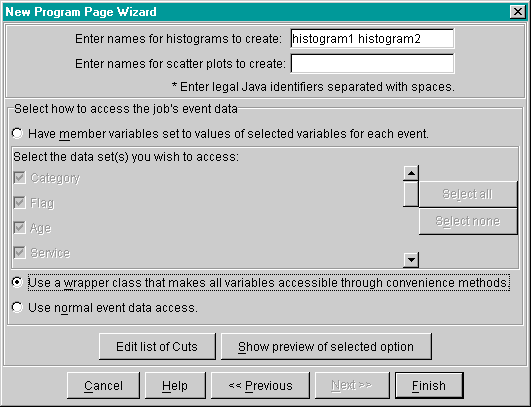
Now the program wizard will display the event analyzer setup page, shown below, which will help you create an analysis source file. To write an analysis routine in JAS, you must create a Java class, compile it, and load it into the application. The wizard will help by creating most of the class source file. A user does not have to use the wizard, but if you don't you should be aware of the guidelines for analysis routines that the wizard normally takes care of for you. The following list provides a brief description of each field in the wizard's event analyzer setup page and the recommended entries for this tutorial:
| For this tutorial create two histograms named 'histogram1' and 'histogram2'. |
| For this tutorial select the second option, which creates methods for accessing data. Click on 'Finish' and the wizard will offer to save the file. It is a good idea to save it now because you cannot compile it until it is saved. Java language rules require that the file name be the same as the class name in order to be readable from the application. In this tutorial the class name used was MyAnalysis, so save the file as 'MyAnalysis.java'. |
A new page named MyAnalysis.java, shown below, is added to the JAS display with the analysis source file in it. The file will be missing only the calculations for your analysis.
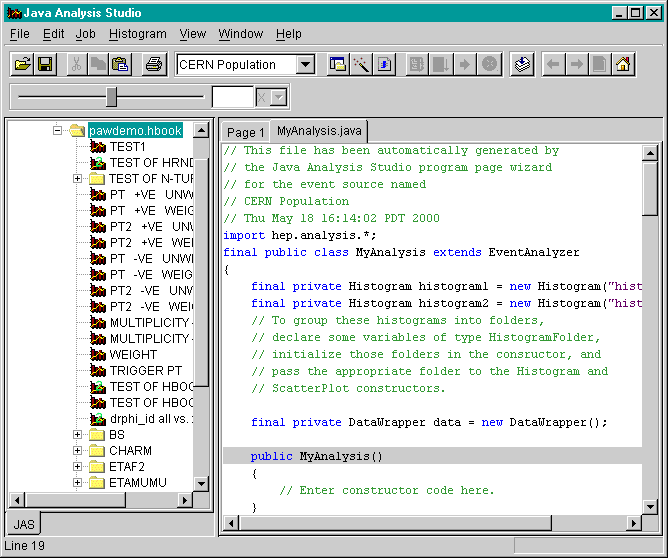
Because you have made use of all of the Analysis Routine wizard options, all you need to do is change the processEvent() method to include the calculations you want. Once that is complete, you will have a syntactically correct file that can be compiled and loaded. Comments in the source file indicate where to insert the calculations. Below is the processEvent() method the wizard has provided.
|
|
All you need to do is complete the calculations where comments indicate. The wizard created a class called DataWrapper, which contains the convenience methods used to access the data. The wizard also initialized an object of this class, called data, which you can use to call the methods. The following instructions will provide some meaningless calculations for illustration.
For this
tutorial change the method definition to what is below, and save your changes by clicking the save
button  . . |
|
|
Now you are ready to compile the source file into a class file and load the class: Jas Tutorial Part 4