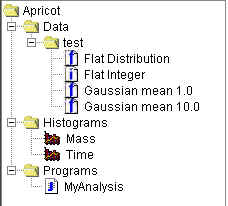
A job is an all-encompassing file. It includes the connection to your data source
(either local or remote) and
the data set selected from that source if applicable, the functions and fitters you have added,
the plots you have generated (see viewing data), and the analysis routine or event
generator you have loaded. The elements of a job are shown on the job tree, as
shown below:
This version of Java Analysis Studio supports two kinds of jobs. In a local job, you can analyze data that are stored on the computer you are using and use local resources for event analysis and generation. The application in a local job interfaces with various data formats using local data interface modules. In a remote job, you can analyze data sets stored on a server and use the server resources for event analysis or generation. That server must be running the Java Data Server code. See the tutorial to start a job.
Page maintained by Jonas Gifford. Last updated 01/14/04.