 Tutorial Tutorial
These instructions assume that you have already successfully completed parts 1 through 5 of the JAS tutorial.
Tutorial parts 1 through 5 showed you some of the valuable functions of JAS while performing a local job for data analysis. This portion of the tutorial will build on that knowledge by showing you how to create timed back-up files.
To reduce potential loss of work, JAS offers a timed backup of text files that you generate while processing jobs (i.e. Source code files). This option is not selected by default.
To select it you need to generate the options dialog,
shown below, by choosing the 'Options...' item from the 'View' menu. Then select the Timed
Backup pane and specify the following:
|
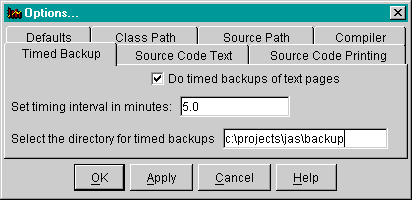
The files will be saved in the selected directory according to the same name they normally have. Unnamed files will be saved according to their hash code (an integer that should be different for each page). You may wish to clean out this directory periodically.