JAS has built in support for formatting and displaying statistics that have been generated from a plotted data set. If a user selects the check box labeled Show Statistics, from the menu items or the popup menu created by right clicking the mouse on the plot, then a statistics text block is created in the plot area. The statistics block displays the plotted data sets' statistics. If multiple data sets are overlaid in the plot area then multiple sets of statistics are displayed. A user can modify the number formatting of the displayed statistics and appearance of the statistics block through the Stats Properties GUI window. The Stats Properties GUI window can be accessed by selecting the Stats Properties check box from the popup menu created by right clicking the mouse on the statistics block.
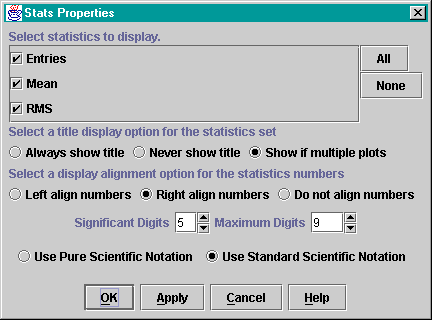
As shown, the Stats Properties window allows a user to set several options, which are detailed below.
Selecting Statistics to Display: All available statistics for the currently displayed data sets are shown in the list of check boxes. A user may individually toggle the listed selections to choose which statistics are to be displayed. For multiple data sets, it is important to note that all of the listed selections may not be an available stat for each statistics set, and hence may not be displayed. If the All/None buttons are pressed then All/None of the statistics will be displayed for each data set.
Choosing a Statistics Set Title Display Option: These options allow a user to choose if they always, never or conditionally want a title to be shown for each statistics set. The idea being that if only one data set is plotted then the user may decide that a statistics set title is unnecessary, however, if multiple data sets are plotted then the user may choose to have titles displayed.
Choosing a Number Alignment Option: These options allow a user to choose if they would like the statistics values (i.e. numbers) to be left aligned, right aligned, or not aligned with one another in the statistics box.
Number Formatting Parameters: These options allow a user to modify the parameters used to format the numerical values by choosing the formatting style, setting the number of significant digits to be displayed and if necessary set the maximum digits of the displayed number. The two available formatting styles are Pure and Standard scientific notation. Pure formatted numbers have precisely the number of digits specified by the significant digits parameter and always specify a base 10 exponential (E). Consequently the maximum digits parameter does not apply to the Pure format. Standard formatted numbers also have the number of digits specified by the significant digits parameter, but will not specify a base 10 exponential (E) if the significant digits parameter is less than the maximum digits parameter.
Page maintained by Paul Spence. Last updated 01/14/04.