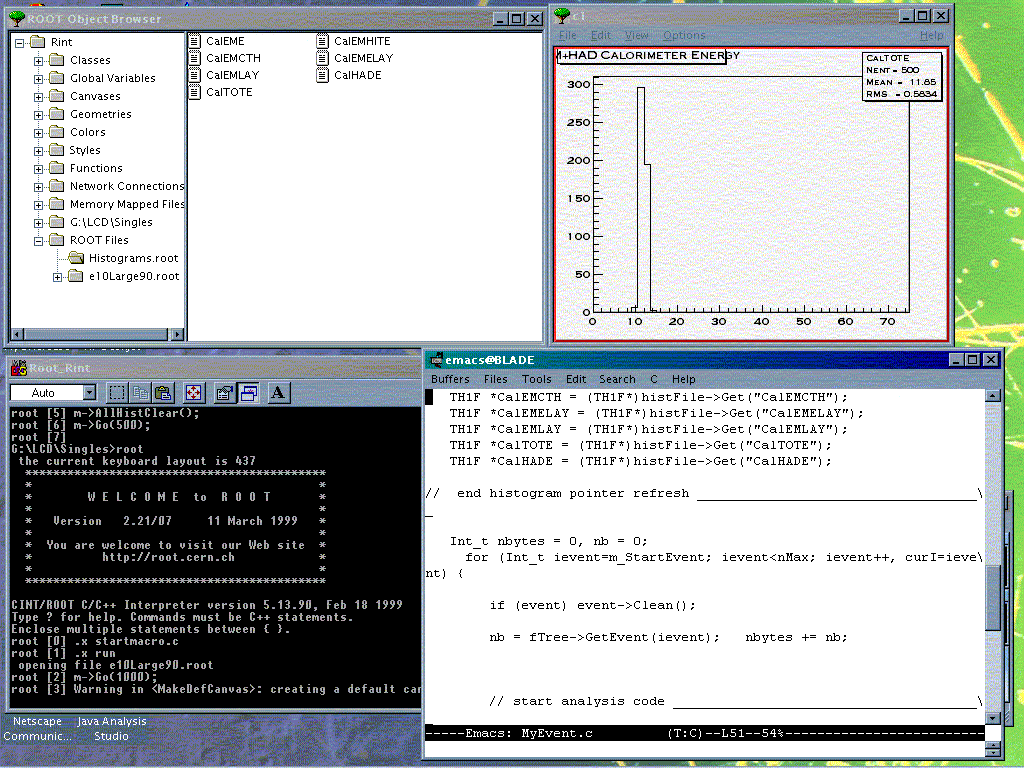
Root usage involves a good deal of arcane detail in terms of setting up the input file, histograms and then cleaning up afterwards. We have created a helper class to take care of many of these details so that the user (you) only has to supply histogram definition and event analysis.
The helper class allows you to:
All user code goes into MyEvent.C, both histogram definitions and event analysis. The class header file, MyEvent.h, should be available in the same directory as MyEvent.C, but need not be modified by the user. These files are available from the Penn repository.
Histograms go in the marked location in the HistDefine member function, while the analysis code goes in the Go function. Note that, due to variable scoping rules, you need to refresh the pointers to your histograms at the beginning of the Go function. Where and how to do this is well marked in the example.
Here is a sample of usage, assuming you have made your modifications to MyEvent.C. Create two macro files:
startup.C
{
new TBrowser; // TBrowser gives GUI access to histograms gSystem->Load("d:/RootEventClasses/event/debug/Event.dll"); // load Event shared lib (wherever you put them) }
run.C
{
gROOT->Reset(); // roll back CINT context to last Save gROOT->LoadMacro("MyEvent.C"); // load your code MyEvent* m= new MyEvent("e10Large90.root"); // create MyEvent object; use file from repository
}
In your root session:
.x startup.C // execute macro for TBrowser and load shared libs .x run.C // execute loading of user code and create MyEvent object
You should not have to re-execute startup.C in your root session. Now do analysis from the command line (for example, process the next 50 events):
m->Go(50); // do 50 events. Then look at histograms in TBrowser
m->HClr(); // clear all histograms
m->Init("AnotherRootFile.root"); // look at a new file
m->Go(); // run all events from the new file
You can then navigate to the histograms in the browser window and display one, as demonstrated here. Then carry on, doing more Go's, etc. Use the Init function to switch input files if desired.
If you wish to modify your analysis or histogram definitions, delete your MyEvent object (m in this example) and re-load MyEvent via run.C:
delete m;
.x run.C
It appears that, between invocations of run.C, if you are looking at the histograms in the TBrowser, you must refresh them by closing and reopening the Root folder in the TBrowser window.
If you do not delete the MyEvent object, the apparent effect is that the previous root files are not closed and they continue to appear in the Root folder in the TBrowser (multiple times). Presumably there is an associated memory leak.
Please let us know if other oddities surface!
| Go(int nEvent) | process the next nEvent events |
| Init(char* rootFileName) | close previous file and open rootFileName (note: histograms are not cleared!) |
| HClr() | clear all histograms |
| Rewind() | set event counter back to 0 |
| StartWithEvent(int stEvent) | set event counter to start with stEvent |
R.Dubois Last Modified: 01/13/04 12:39