Linear Collider Detector Project
Running Gismo/GismoApps
This document contains instructions for running the Gismo/GismoApps simulation tool used in LCD studies. Gismo is the (experiment independent) simulation engine and GismoApps are the LCD applications which have been written to run on top of Gismo.
Finding the Executables
The Gismo/GismoApps suite provides two executables, one for use interactively and one for use in batch. Their location will depend on the specifics of the installation at your site, but assuming an installation along the lines of:
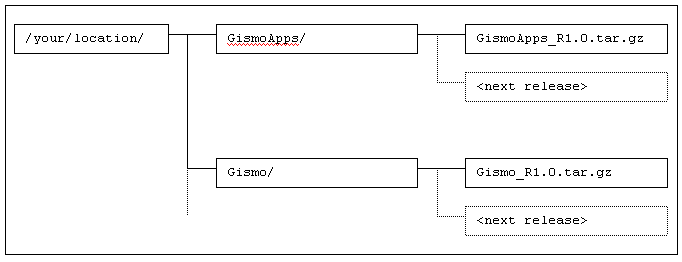
then the executables will be in:
- /your/location/GismoApps/GismoApps_R1.0/win/win/<version>/exe/<sys>/win_win
- /your/location/GismoApps/GismoApps_R1.0/bat/bat/<version>/exe/<sys>/bat_bat
where:
- win_win is the interactive executable
- bat_bat is the batch executable
- Executables in Windows/NT will have a .exe extension.
- <version> is a version number (V-2-0-3 for both win_win and bat_bat in release GismoApps_R1.0)
- <sys> is the response on your system to the command `uname` (on Unix) or the string nt (on Windows/NT)
At which point I would like to apologise for the terrible names. These executables used to be called lcd_win and lcd_bat which makes far more sense. Unfortunately we ran into disk size limitations when we attempted to maintain both executables for four different Unix platforms and keep one back version. At around 25M per executable that comes out to 400M which is far in excess of the volume size our computer centre likes us to use. We were therefore forced to split the directory structure so we could keep the interactive and batch executables on separate volumes.
Running the Executables
Executing win_win or bat_bat is entirely conventional. You can put the relevant directory on your search path in which case the simple command win_win or bat_bat will activate the executable. Alternatively you can type out the whole path name (painful!)
Far more interesting is how these programs are configured. To avoid a lot of twisted English, these instructions will be phrased for the bat_bat executable, but both executables work the same way.
bat_bat requires eight pieces of information. These are:
- Name of the detector description file.
- A string defining the type of the event file. Must be one of HEPEVT, ONEEVT or NBEAM. ONEEVT and NBEAM are synonyms. HEPEVT declares that the filename that follows contains HEPEVT style events. ONEEVT declares that the filename that follows is an ASCII file containing 'test beam' particle information.
- Name of the input event file. Either a HEPEVT file or an ASCII 'test beam' file (see previous item).
- Number of events to be processed.
- Name of the output file where simulation results should be written (if undefined, no output file is written).
- Run number.
- Seed for the random number generator.
- The directory where bat_bat can find material description files.
The first seven of these can be provided in one of three ways (in the following search order):
- From the command line.
- From the value of an environment variable.
- From a program default.
Arguments on the command line are interpreted strictly by position, so arguments cannot be omitted (not quite true ... trailing arguments can be omitted). To solve the problem of maintaining the argument order without forcing the user to define all arguments, bat_bat does accept a 'placeholder' for any argument (the placeholder symbol is the underscore). The environment variables searched and the program defaults are as follows:
| Environment Variable | Program Default | |
| Detector Description | LCD_DETECTOR_FILE | detector.ini |
| Event Source Type | LCD_SOURCE_TYPE | ONEEVT |
| Event Source File | LCD_ONEEVT_FILE (when type is ONEEVT) | beam.ini |
| LCD_HEPEVT_FILE (when type is HEPEVT) | <none> | |
| Events to Process | LCD_EVENTS | 1 |
| Output File | <none> | <none> |
| Run Number | LCD_RUN | 1 |
| Random Seed | LCD_SEED | 19780513 |
The final piece of information, where to locate material description files, can be provided only one way. Set up the environment variable PEGS4PATH as a search path of directories where bat_bat should look. With the example installation:
setenv PEGS4PATH /your/location/GismoApps/GismoApps_R1.0/PEGS4 (or logical equivalent for your operating system/shell)