hep.analysis Users' Guide
Overview
The hep.analysis package is designed to allow accumulation of
histogram data. Although the intention is to support
multi-dimensional histograms in the future the current
implemention supports only one dimensional histograms.
This package is extremely immature and many of the classes
listed in the hep.analysis
package documentation are incomplete, but the features listed
in this user guide are all available and should work (to some
approximation!).
Getting Started
Creating and Filling Histograms
Histograms are always created as an instance of the Histogram class, which may
represent 1D or 2D histograms or scatter plots. Histograms are
always assigned a name when they are created, and these names can
be used to locate the histograms later (to avoid the necessity to
always pass around references to the booked histograms).
Histograms may optionally be inserted into HistogramFolders,
which are used to logically group histograms together.
HistogramFolders can also be used to provide default display
styles for the Histograms they contain, and can be used to create
automatic overlays for histograms (for example a histogram in a
folder named "data" can be automatically overlaid by a
histogram with the same name in folder "Monte-Carlo").
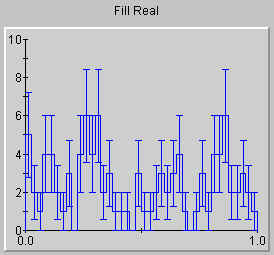
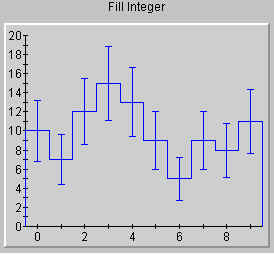
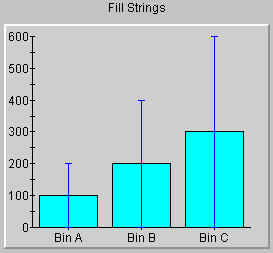
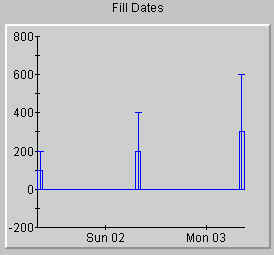
Filling histograms is achieved by using the fill method in the
Histogram class. The
fill method takes a wide variety of arguments, making is possible
to have the histogram bins correspond to real, integer, time or
even arbitrarily named bins. Some examples should make this
clearer:
| Example Code |
Resulting Histogram |
Histogram hist =
   new Histogram("Fill Real");

for (int i=1; i<100; i++)
   hist.fill(Math.random());
|
|
 |
Histogram hist =
   new Histogram("Fill Integer");

for (int i=1; i<100; i++)
{
   int j=(int) (10*Math.random());
   hist.fill(j);
}
|
|
 |
Histogram hist =
   new Histogram("Fill Strings");
hist.fill("Bin A",100);
hist.fill("Bin B",200);
hist.fill("Bin C",300);
|
|
 |
Histogram hist =
   new Histogram("Fill Dates");
hist.fill(new Date("1 Jan 2000"),100);
hist.fill(new Date("2 Jan 2000"),200);
hist.fill(new Date("3 Jan 2000"),300);
|
|
 |
Partitions
The actual accumulation of data within a histogram is
controlled by a partition class associated with each histogram.
By default a partition is assigned to the histogram the first
time the fill method is invoked, but you can override this
default behavior by explicitly calling the setPartition method of
the Histogram before fill is called. A wide variety of partitions
are provided with the hep.analysis package, and summarized below,
but partitions can also be user defined, enabling specialized
histograms to be easily created.
| Partition |
Axis Type |
Use |
| FixedPartition
|
double, int |
Fixed partition provides behavior similar to a
tradition histogram as implemented by HBook or Handypak.
At partition creation time the axis range (minimum and
maximum) must be specified, as well as the number of
bins. The partition then keeps track of the sum of the
weights in each bin. The data cannot later be rebinned. |
| FixedMeanPartition |
double, int |
Similar to the fixed partition described above,
except that instead of calculating the sum of the weights
in each bin, it calculates the mean and RMS of the
weights in each bin. |
| SimplePartition |
double, int |
The simple partition stores all the values
"filled" into the histogram, and doesn't bin
them until a request is received to display the data.
This means that the data can be easily rebinned at any
time, or the minimum and maximum axis ranges can be
changed at any time. It also means it is not necessary
for the user to specify the axis range at the time the
partition is created (although they can optionally do
so). The downside is that the SimpleParition can use a
very large amount of memory if there are many calls to
the fill method. |
| SimpleIntPartition |
int |
This partition behaves similarly to the
SimplePartition, except that it only supports integer x
axis values, and thus guarantees that the binwidth will
always be an integer. |
| SimpleDatePartition |
Date |
Similar to the simple partition described above, but
the X axis represents time. |
| StringPartition |
String |
This partition is used when the X axis represents
discretely named bins. The partition maintains a hash
table which associates the sum of the weights associated
with each named bin. |
If partitions are not explicitly set by the user then the
following defaults apply.
User Defined Partitions
Documentation not yet available.
Extracting Information from Histograms
Documentation not yet available.