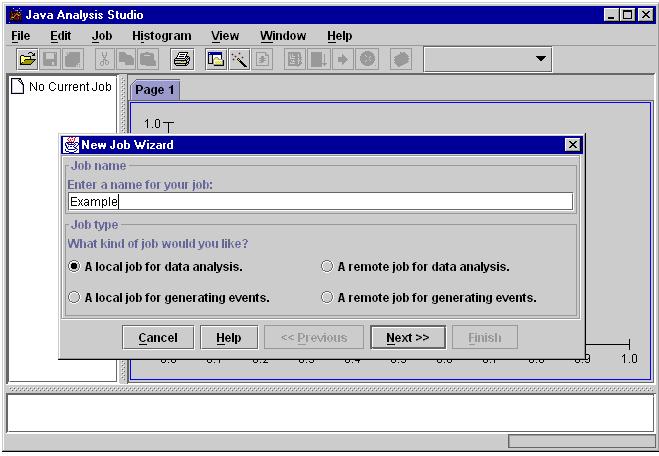
Java Analysis Studio is a desktop data analysis application aimed primarily at offline analysis of high-energy physics data. The goal is to make the application independent of any particular data format, so that it can be used to analyze data from any experiment. The application features a rich graphical user interface (GUI) aimed at making the program easy to learn and use, but which at the same time allows the user to perform arbitrarily complex data analysis tasks by writing analysis modules in Java. The application can be used either as a standalone application, or as a client for a remote Java Data Server. The client-server mechanism is targeted particularly at allowing remote users to access large data samples stored on a central data center in a natural and efficient way.
|
When the application is first started it presents the user with the interface as shown above. The goal is to present the user with a consistent interface from which all analysis tasks can be performed. The graphical user interface also features a complete help system, wizards to help new users get started, facilities for viewing and manipulating plots, and is extensible via Plugins written in Java to provide user or experiment specific features.
At any point the entire state of a project may be saved to a file and then later restored.
Although some other graphical analysis environments allow users to define their analysis by wiring together pre-built analysis modules, we believe that the complexity of real-life physics analysis problems quickly makes such approaches unworkable. So although JAS allows some simple analysis operations to be performed using the graphical user interface, serious analysis is done by writing analysis modules in Java. Java is an excellent language for performing physics analysis since it is much easier to learn and use than C++, yet at the same time it is a very powerful and fully object-oriented language.
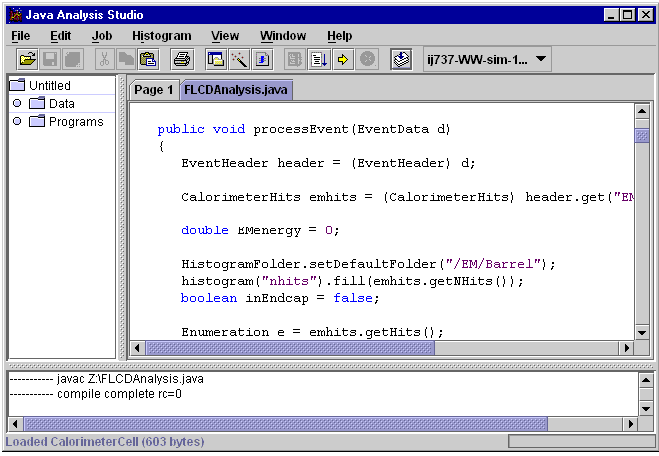 |
Java works by compiling user written classes into a machine independent format called bytecodes. As the bytecodes are executed they are normally translated on-the-fly into native machine code (a process known as just-in-time compilation). Java performance has continued to improve over time. IBM has recently released versions of Java incorporating their optimized just-in-time compiler that run under AIX, Linux, OS/2 and Windows and which give almost a factor of 10 improvement in speed over earlier Java implementations. Java modules can be dynamically loaded and unloaded from running programs, with no linking involved, which results in a very fast code, load, run, debug cycle excellent for rapid development of analysis algorithms.
Java Analysis Studio is provided with a package of classes for creating, filling and manipulating histograms. Binning of histograms is delegated to a set of partition classes, which allows great flexibility in defining different types of built-in or user-defined histograms. The built in partition classes support histograming dates and strings as well as integers and floating-point numbers, and also support either traditional HBOOK style binning while filling, or delayed binning which allows histograms to be rebinned and otherwise manipulated using the GUI after they have been filled.
Unlike most other data analysis applications which force the user to first translate the data into a particular format understood by that application, Java Analysis Studio is able to analyze data stored in almost any format. It does this by requiring that for any particular data format an interface module be available which can provide the glue between the application and the data. The application is distributed with several built-in Data Interface Modules (DIMs), which provide support for paw n-tuples, hippo n-tuples, SQL databases (implemented using Java's JDBC database interface), StdHEP files and flat-file n-tuples.
Support is provided for analyzing either n-tuples or arbitrarily complex object hierarchies. While analyzing n-tuple data a number of graphical user interface options are available for plotting columns of data singly or in pairs, as well as applying cuts. The intention is to provide an interface similar to that provided by HippoDraw. While analyzing n-tuple data can sometimes be convenient it is also rather limiting, and therefore we also support analysis events consisting of arbitrarily complex trees of objects.
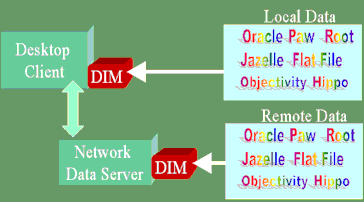 |
JAS can read data stored on the user's local machine, or stored on a remote data server. The application has been designed from the outset with this client-server approach in mind, and as a result the interface that is presented to the user is identical whether the data being analyzed is stored locally or on a remote server. When running in client-server mode the user's analysis modules are still edited and compiled locally, but when run the analysis modules are sent over the network and executed on the data server.
Since the analysis modules are written in Java and compiled into machine independent class files it is easy to move them from the users machine to the remote data server. The Java runtime provides excellent built-in security features to prevent user analysis modules from interfering with the operation of the data server on which they are running. When the user requests to see a plot created by an analysis module, only the resulting (binned) data is sent back over the network, resulting in a very modest bandwidth and latency requirements even when analyzing huge data sets. Due to its modest network requirements JAS works quite well even when accessing a remote data server via a 28.8 kb modem.
It is hoped that the client-server features built into Java Analysis Studio will prove particularly useful to researches who typically access data from Universities where it is not possible to store the Petabyte sized data samples typically generated by today's HEP experiments. Using Java Analysis Studio such researchers can still take advantage of the powerful graphical features of their desktop machines, while analyzing data which is stored remotely. The performance of JAS is such that it is quite possible to forget that the data is not located on the local machine.
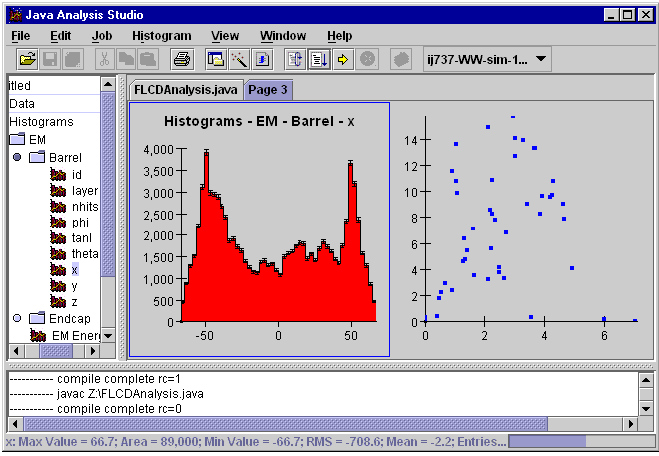 |
One of the key components of Java Analysis Studio is the JASHist bean, which is responsible for the display of histograms and scatter plots. The charts are very efficient at redrawing themselves, so that they can easily display rapidly changing data. By interacting with the GUI, end users can easily change the title or legends just by clicking on them and typing new information, and can change the range over which data is displayed just by clicking and dragging on the axes.
The JASHist bean is designed using the model-view-controller pattern, so that data to be displayed need only implement a simple java interface and need have no other dependence on the JAS package. This makes interfacing arbitrary data to the plot bean very straightforward. Care has been taken in the design and implementation of the JASHist bean to ensure that it is a modular component that can be used easily in other applications.
The current JASHist bean includes support for:
Display of 1-D histograms, 2-D histograms and scatter plots. Scatter plot support is
optimized to handle up to millions of points.
Overlaying of several histograms or scatter plots on one plot.
 |
Java Analysis Studio has been designed to be extended by end users and/or by experiments. A number of API's have been defined to make it possible to build extensions without having to understand the details of the Java Analysis Studio implementation. Currently supported extension API include:
The application has been built as far as possible on industry standards and using commercial components where consistent with the goal of making the final application redistributable with no runtime license fees.
JAS is now an open source project, with source code browsable directly from the JAS web site (using jCVS servlet), or accessible using any CVS client. The instructions for gaining read-only access to the CVS repository are available on the JAS web site, and read-write access is available to registered developers. Our intention is to continue to refine the design of JAS to make it easier to integrate with other applications and our hope is that making the source available will make it easier for other to understand how it works, and to contribute fixes and improvements.
In order to further facilitate cross-platform development we have adopted jmk, a pure Java utility similar to make. This enables JAS to be built on any platform with a Java Development Kit (JDK) available.
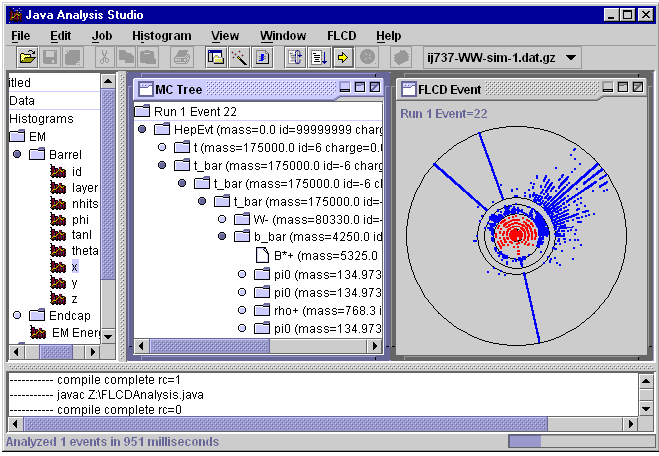
The US Linear Collider Detector (LCD) group has build an entire reconstruction and analysis framework in Java, which can either be run standalone or inside Java Analysis Studio. As part of this effort some standard 3-vector, 4-vector, event shape and jet finding routines were developed and these have subsequently been integrated into the physics utility section of JAS 2.0.
The LCD group has used the Plugin functionality of JAS to provide an event display that can be run inside JAS and automatically adapts to different detector geometries. The LCD group has also set up a central data repository at the University of Pennsylvania running the Java Data Server software provided with JAS so that physicists anywhere can use the JAS client to connect to the Penn server and analyze the data stored there.
Babar is using JAS as a means of presenting online monitoring histograms to physicists on shift in the Babar control room. They use a three-tier approach using a server that acts as a gateway between their CORBA based distributed histogram facility and JAS RMI based client/server communication protocol. The server is implemented in Java and uses the JAS online monitoring API. Histograms are displayed in the JAS client using a HTML pages with embedded live plots for each detector subsystem. The HTML pages also provide descriptions of the plots, and contain hyperlinks to additional pages with more detailed diagnostic histograms. Babar also uses the custom overlay feature of JASHist to provide specialized plots such as online scalers. Code for the custom overlays can be dynamically downloaded from the server to the JAS client so there is no need for special software to be installed on the client.
At the time of writing Java Analysis Studio version 2.0 Alpha 2 is available for download from our web site at: http://www-sldnt.slac.stanford.edu/jas/download/v20alpha2.htm. Currently we support for Windows (NT/95/98), Linux and Solaris, however since the application is written entirely in Java (except for the optional paw, hippo and stdhep DIM's) it should work on any platform with a JDK 1.1 (or greater) compliant Java Virtual Machine.