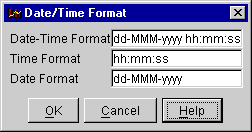
The Data Time Format dialog is part of the Flat File Wizard page.
You can use the dialog to set the formats that will be used when identifying columns as containing dates or time. To specify the format use a pattern string. In this pattern, all ASCII letters are reserved as pattern letters, which are defined as the following:
The count of pattern letters determine the format.Symbol Meaning Presentation Example ------ ------- ------------ ------- G era designator (Text) AD y year (Number) 1996 M month in year (Text & Number) July & 07 d day in month (Number) 10 h hour in am/pm (1~12) (Number) 12 H hour in day (0~23) (Number) 0 m minute in hour (Number) 30 s second in minute (Number) 55 S millisecond (Number) 978 E day in week (Text) Tuesday D day in year (Number) 189 F day of week in month (Number) 2 (2nd Wed in July) w week in year (Number) 27 W week in month (Number) 2 a am/pm marker (Text) PM k hour in day (1~24) (Number) 24 K hour in am/pm (0~11) (Number) 0 z time zone (Text) Pacific Standard Time ' escape for text (Delimiter) '' single quote (Literal) '
(Text): 4 or more pattern letters--use full form, < 4--use short or abbreviated form if one exists.
(Number): the minimum number of digits. Shorter numbers are zero-padded to this amount. Year is handled specially; that is, if the count of 'y' is 2, the Year will be truncated to 2 digits.
(Text & Number): 3 or over, use text, otherwise use number.
Any characters in the pattern that are not in the ranges of ['a'..'z'] and ['A'..'Z'] will be treated as quoted text.
Examples Using the US Locale:
 Format Pattern                         Result
 --------------                         -------
 "yyyy.MM.dd G 'at' hh:mm:ss z"    ->>  1996.07.10 AD at 15:08:56 PDT
 "EEE, MMM d, ''yy"                ->>  Wed, July 10, '96
 "h:mm a"                          ->>  12:08 PM
 "hh 'o''clock' a, zzzz"           ->>  12 o'clock PM, Pacific Daylight Time
 "K:mm a, z"                       ->>  0:00 PM, PST
 "yyyyy.MMMMM.dd GGG hh:mm aaa"    ->>  1996.July.10 AD 12:08 PM
For more details see the JDK documentation on the java.text.SimpleDateFormat class.
Page maintained by Tony Johnson. Last updated 01/14/04.