![shoeline2[1].gif (1488 bytes)](../shoeline21.gif)
[Feedback][Tutorial Contents][hep.lcd Home]
Before you can read .lcd files locally you must register the .lcd file Data Interface
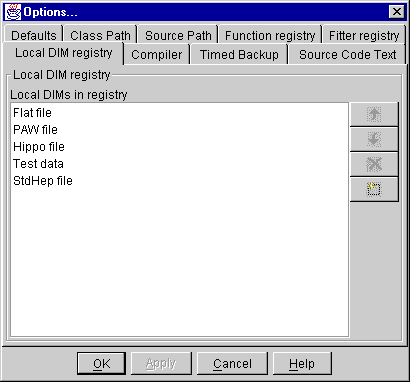
Module (DIM). To do this choose View, Options and click on the Local DIM Registry tab.
Here you will see a list of all the file types that can be read locally. If LCD Files does
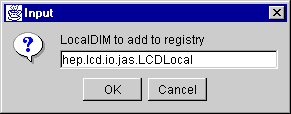
not appear as an entry in the list then click on the New button ( ), and in the resulting
dialog enter hep.lcd.io.jas.LCDLocal (case sensitive) then click OK. Once this change is
made it should be remembered between sessions, so you should not have to do it again.
), and in the resulting
dialog enter hep.lcd.io.jas.LCDLocal (case sensitive) then click OK. Once this change is
made it should be remembered between sessions, so you should not have to do it again.
Now you can create a new job, select Local Job for Data Analysis, then choose a file type of LCD File, and finally open the file you want to read.

