JAS is designed to make it possible to extend its functionality by writing experiment or user specific modules, called plugins. There are currently two types of plugins supported:
At startup JAS scans a number of directories looking for JAR files. These directories are:
Each JAR file found is added to the JAS extension CLASSPATH. Once all of the JAR files have been added to the CLASSPATH, then each jar file is searched to see if it contains an internal JAS-inf directory containing a file plugins.txt. Each JAS-inf/plugins.txt file that is found is then read, and each line within the file is assumed to contain the name of a class that extends ExtensionPlugin. Each of these classes is then loaded (with an error message sent to the standard error stream if the class cannot be loaded).
The net result of all this is that to create a new ExtensionPlugin for JAS as a developer you have to create the class that extends ExtensionPlugin, package it up with any other classes it needs into a JAR files, and add a JAS-inf/plugins.txt file to the JAR file. Now the user of your extension just has to drop the JAR file into one of the JAS extension directories, and everything should just work. Note that all of the Data Interface Modules (DIMs) that are supplied with JAS are currently packaged in this way.
All java programs use the classpath mechanism to load classes. Typically the classpath is implemented as an environment variable which translates to a set of directories or JAR files to search for classes as they need to be loaded. Most users of Java only see the standard system classpath, implemented using the environment variable CLASSPATH. The system classpath is special in some ways in that:
To overcome these limitations Java programs may define their own ClassLoaders, which use some other mechanism instead of, or in addition to, the normal system classpath.
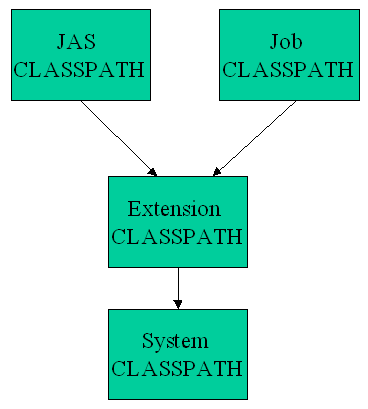
JAS uses several such ClassLoaders/classpaths which can sometimes cause confusion to people trying to write extensions, but is pretty much required to get around the limitations above. The classpaths used are as follows:
Confused yet? Well to make matters somewhat worse, these different CLASSPATHs are hierarchical. For example a class loaded via the Job CLASSPATH can refer to a class loaded via the Extension CLASSPATH, but not vice-versa. The hierarchy is shown below.
BUG Alert: For some reason it appears that classes loaded from a classpath other than the System CLASSPATH are not able to load native libraries. Therefore currently it is necessary to add extension libraries which are going to load native libraries (such as the PAW extension and the StdHEP extension) explicitly into the System CLASSPATH as well as in the extensions directory. This is done by default for the standard extensions, but if you write you own extension which loads native libraries you will have to deal with this yourself. Hopefully a workaround for this will be discovered soon.
The following is an example of a very trivial and not very useful ExtensionPlugin. When it is initialized it adds a new menu to the application with a single item in it which, when selected, displays the current time and Java memory usage in the status area at the bottom of the screen.
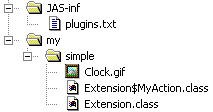
Now to make this file usable we build a JAR file which has the class files resulting from compiling this class, along with the GIF file used for the icon on the menu, and a plugins.txt file which contains a single line:
The structure within the JAR file is show in this diagram:
You can try it out by downloading the JAR file, and then copying it into your JAS extensions directory. Next time you fire up JAS you should have a new Simple menu!
BUG Alert: This doesn't work properly with 2.0 Alpha 2 due to some small bugs. These will be fixed in the next release.