Distributed Computing With JAS
Contents
This document describes a prototype distributed computing package for use
with JAS. The package enables data analysis to be performed on a farm of
machines, while using the standard JAS client to create analysis modules,
control job execution and view plots. This can be useful for CPU-intensive
analysis, where the CPU power of many machines running in parallel can be
exploited, or for data-intensive analysis, where the IO power of each machine
can be exploited by distributing the data to local disk on the farm machines.
The package described here works with the standard JAS client and server,
version 2.2.4 or later. The distributed computing package consists of three main
components:
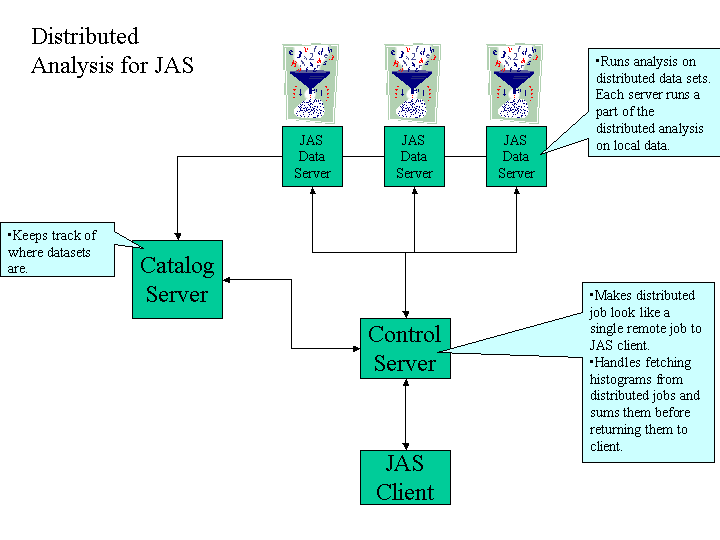
- A catalog server which keeps track of what data is available to each
machine in the farm.
- A protocol module which can be loaded into the JAS server, to cause it to register
itself and its data with the catalog server.
- A control server. This server looks like a normal JAS data server to the
JAS client, but uses the catalog server to find out what data is available,
and distributes jobs submitted to it to the different machines in the farm.
The control server is responsible for making a distributed job running on
the farm look like a single job to the client. One particularly important
function is to collect up histograms from the server and present them to the
JAS client as a single (summed) histogram.
The following figure illustrates the different components of the distributed
computing package.
Future of distributed computing in JAS - working with the GRID
The current implementation of distributed computing for JAS is a prototype to
explore design strategies. In the future many of the services provided by the
GRID infrastructure would fit naturally into an improved implementation of this
package. In particular:
- Currently data has to be distributed manually to the various machines in
the farm. A much better implementation would use GRID services to copy the
data to different machines.
- The catalog server provided as part of the current package could be
replaced by a more flexible GRID catalog server. In addition to locating the
data the GRID could be used to dynamically locate servers with resources
available to run analysis jobs.
- There is no authentification mechanism in the current package. The
distributed authentification scheme provide by the GRID could be used to
control which users have access to which resources.
Combining the JAS distributed analysis package with the GRID would result in
a system by which user would be able to exploit the enormous computing and
data-access power of the GRID, while still using an interactive graphical user
interface.
Limitations of Current Implementation
Implementation limitations - should be fixed soon
- Erroneous title when clicking on histograms in tree
- Clicking on n-tuple columns does not work
- Single stepping through events does not work
- Manually clearing/renaming histograms does not work
- Some confusion occurs when multiple simultaneous jobs are run on the same control server
Limitations which require more effort to fix
The current implementation uses the standard JAS communication protocol, Java
RMI. This works with about 50 nodes, but will not scale up to 1000 nodes.
Instead a scalable system would have to use some type of stateless asynchronous
messaging protocol, perhaps JMS.
The current implementation relies on all nodes working correctly. In
particular it will hang up if some machine fails to respond to a request, or
will abort an operation if a single machine generates an exception. A scalable
system would have to be resilient to network or machine failures, and would
preferably be able to compensate for machine failures (for example by
resubmitting the task which was assigned to the failed machine to a new node).
Using the Distributed Computing Package
Setting Things Up
You need these items to be able to run the distributed computing package
- JAS (version 2.2.4 or later, available here)
- Java JDK (preferably 1.3.1) (You could use the jre distributed and
installed with JAS, except that it doesn't include rmiregistry -- maybe this
should be fixed)
- The distributed computing package, CSC.jar, available here.
Since the code is all written in Java it can be run on any type of machine
(or even a farm of non-heterogeneous machines). These following instructions use
windows syntax, you will need to make necessary compensations if using a
different type of machine.
Define the following environment variables
- JDKHOME - to point to the directory where you installed the JDK - e.g.
c:\JDK1.3.1
- JASHOME - to point to the directory where you installed JAS - e.g.
c:\Program Files\Java Analysis Studio
- CSCHOME - to point to the directory containing CSC.jar
Set your PATH and CLASSPATH environment variables as follows:
- PATH=%JDKHOME%\bin;%JASHOME%\bin;%PATH%
- CLASSPATH=%CSCHOME%\CSC.jar;%JASHOME%\lib\jas.jar;%JASHOME%\lib\hep.jar;%JASHOME%\lib\collections.jar
Setting up rmiregistry
rmiregistry must be run on all nodes which will be used as servers, including
the node that will run the catalog server, the node that will run the control
server, and any nodes that will run JAS servers. Note that CLASSPATH should not
be set when running rmiregistry.
set CLASSPATH=
rmiregistry
Setting up the catalog server
The catalog server must be started before starting any JAS servers. The
catalog server can be run on any node.
java catalog.implementation.CatalogServer
Setting up the control server
The control server can be run on any node.
java CSCServer <catalog-host>
where <catalog-host> is the name of the node that is running the
catalog server. Note the control server appears to the JAS client exactly like a
normal JAS data server, except that it registers itself with the rmiregistry
under the name CSCServer instead of JDSServer. This is to make it possible to
run a normal JAS data server and a control server on the same node.
Setting up the JAS data servers
Follow the normal instructions for setting up and running a JAS Data Server,
except add at the end of the config file the following line:
Protocol protocol.CatalogProtocol <catalog-host>
This will cause the server to register itself and its data with the catalog
server. The catalog server makes the following assumptions:
- Datasets with exactly the same name (and path) are assumed to be
equivalent. When a job requests that dataset the catalog server will
randomly select a node on which to run the analysis of that dataset.
- Datasets of the form xxx-nn.xxx (where nn is one or more digits, and xxx
is anything) are assumed to be the nn'th part of a larger dataset. The
catalog server will group these datasets together, replacing nn with *. A
request to analyze the combined dataset will result in the analysis being
distributed to all nodes containing one or more parts of the data. If the
same part exists on multiple nodes a node will be chosen randomly. If
multiple parts of the data exist on a single node multiple jobs will be
submitted to that node (this may change in future - perhaps it would be
better to submit a single job which would sequentially read each part -- but
this would require a change in the JAS data server).
A specific example is also available.
Starting up the JAS client and running a distributed job.
- Start the JAS client
- Select Job, New Job
- Choose a Remote Job for Data Analysis, Next
- Enter the name of the host on which your control server is running. Click Advanced
Connection Options, and set the service name to CSCServer (instead of
JDSServer). Note that JAS always resets the service name to its default when
you start a new job, so you must explicitly set the service name each
time you connect to a control server. Click OK, Next.
- Choose the dataset you want to analyze. If the dataset is composed of
different segments of data on different nodes the catalog server will have
inserted an asterisk into the name of the dataset.
- Click Finish.
Once you have connected to the Control Server then the JAS client should
function the same as when you are running a local job, or a normal client-server
job, subject to the limitations described earlier.
Here is a specific example.